
Marshall District Library WordPress Architecture on AWS
1. Project Overview
This project focused on modernizing the Marshall District Library (MDL) website—a public-facing WordPress installation serving the library's patrons.
The goal was to improve uptime, simplify maintenance, and ensure stable performance during event-driven traffic surges.
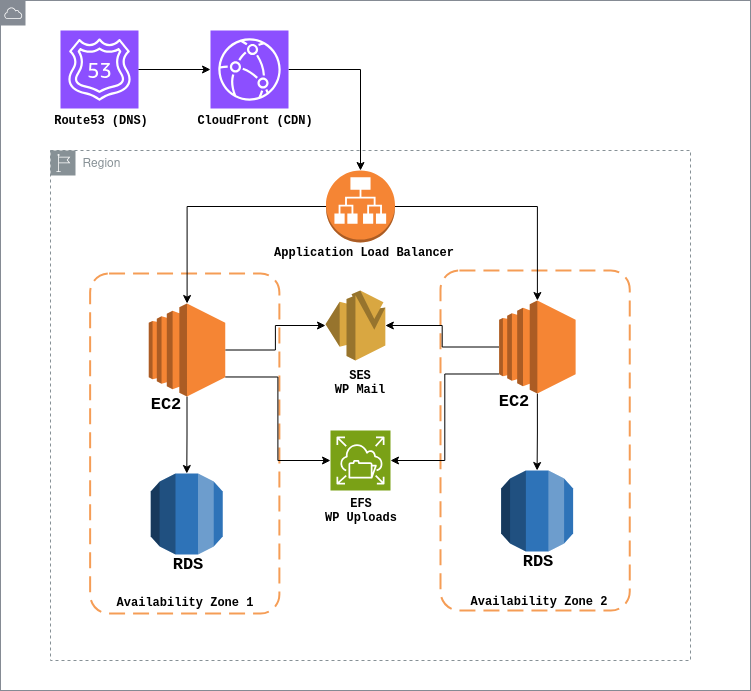
The new system runs on AWS Elastic Beanstalk with a load-balanced, multi-AZ architecture backed by Amazon RDS, Amazon EFS, and CloudFront for global content delivery.
2. Challenge / Problem
MDL's previous environment was hosted on a shared server where the web server, database, and uploads all resided on a single instance.
As content expanded, performance degraded sharply. Database crashes became common due to sustained high memory and CPU usage—especially from The Events Calendar plugin, which generated a proliferation of dynamic event and tag URLs.
Web crawlers repeatedly accessed outdated or expired event pages, compounding the load and triggering further slowdowns.
The shared hosting constraints led to:
- CPU usage consistently above 50%
- Memory spikes above 90%
- Frequent "database connection lost" errors
- Sluggish response in the WordPress admin dashboard
3. Design Decisions
To increase reliability while keeping operational complexity low, the new environment was rebuilt using AWS managed services:
- Elastic Beanstalk (Load-Balanced Environment) – Manages provisioning, health checks, and rolling updates. This setup allows MDL's IT staff to administer the site even when developers are unavailable.
- Amazon RDS (MariaDB) – Provides isolated, predictable database performance with automated backups. The migration retained MariaDB for compatibility with existing WordPress data.
- Amazon EFS – Stores shared
wp-content/uploads, ensuring media persists across scaling events and simplifying future growth. - CloudFront + Route 53 – Delivers global caching and robust DNS management, improving latency for visitors outside Michigan.
- Redis Object Caching (local) – Added via configuration and plugin for database query optimization while keeping AWS costs low.
Trade-offs:
Elastic Beanstalk was selected for manageability over single EC2 instances. Future improvements include Elasticache for Redis.
4. Architecture Diagram
5. Implementation Highlights
- Deployed Elastic Beanstalk with rolling updates and autoscaling.
- Configured EFS mounts using
.ebextensionsscripts. - Added Redis object caching through
wp-config.php. - Automated full daily backups of RDS, EFS, and Beanstalk via AWS Backup.
- Connected CloudWatch metrics to Grafana dashboards for real-time CPU, memory, and network monitoring.
- Integrated Google Analytics data with CloudWatch logs for a unified performance overview.
6. Results / Impact
In the first 30 days after migration:
- Pageviews: 5,935
- Active Users: 1,909
- CPU Utilization: ↓ to below 10% average
- Database Errors: Virtually eliminated
- Admin Dashboard Performance: Significantly improved
The new AWS environment achieved steady 99.9% uptime and eliminated the recurring database instability that previously disrupted site operations.
7. Reflection
This migration proved that WordPress can be both user-friendly and cloud-resilient when paired with modern AWS services.
The greatest challenge was designing a clean CI/CD pipeline for a CMS that assumes single-server persistence. WordPress tightly couples configuration and database content, so scaling required careful orchestration of updates and environment state.
Lesson learned: keep deployments clean and version-controlled; distributed WordPress can work, but it rewards discipline.
Personal takeaway: I gained deep insight into how WordPress can evolve into a modern, maintainable platform—balancing performance, cost, and resilience for public institutions like MDL that depend on consistent digital access.